
TL;DR:
- After a breach, immediately reset compromised credentials and enable two-step verification to secure accounts effectively. Prioritize securing your email, scanning devices for malware, and replacing weak passwords with long, unique passphrases or passwords generated by a manager. Implement passkeys where supported and use breach monitoring tools like Klaw to stay ahead of emerging threats and prevent secondary compromises.
Strengthening weak passwords after a breach means immediately resetting compromised credentials, enabling two-step verification (2SV), and replacing traditional passwords with passkeys wherever possible. A data breach does not end when the notification arrives. The real damage happens in the hours after, when attackers use stolen credentials to access your email, bank, and social accounts before you do. This guide applies the latest 2026 guidance from NIST SP 800-63B and the UK National Cyber Security Centre (NCSC) to give you a clear, prioritized recovery workflow that actually holds up.
How to strengthen weak passwords after a breach: your first steps
The first 30 minutes after discovering a breach determine how much damage gets done. Speed and sequence both matter here.
-
Secure your email account first. Your email controls password resets for every other account you own. Email account priority is the single most important sequencing decision you make post-breach. An attacker who holds your inbox can lock you out of everything else within minutes.
-
Use recovery flows if you are locked out. If an attacker already changed your password, do not panic. Recovery mechanisms exist for exactly this scenario. Use your phone number, backup email, or identity verification to reclaim the account before changing anything else.
-
Scan your device for malware before touching passwords. This step surprises most people, but it is non-negotiable. Device malware captures new passwords the moment you type them, meaning a clean reset on an infected machine accomplishes nothing. Run a full scan with tools like Malwarebytes or Windows Defender before you change a single credential.
-
Enable two-step verification on every account you recover. The UK NCSC identifies 2SV as the most important protective measure against phishing and credential compromise. A stolen password becomes useless to an attacker the moment 2SV is active.
-
Review account recovery settings. Attackers often plant a backup email or phone number in your account settings before leaving. Check every recovery option and remove anything you did not add yourself.
Pro Tip: Before changing any password, restart your device in safe mode or run a malware scan. A compromised device makes every new password you create immediately vulnerable.
How to create strong passwords that replace compromised ones

Password strength in 2026 is defined by length and uniqueness, not by the number of symbols you cram into 8 characters. This is a direct shift from older advice, and it is backed by updated NIST password guidelines that explicitly drop arbitrary complexity rules in favor of longer passphrases.
Here is what actually works when you update compromised passwords:
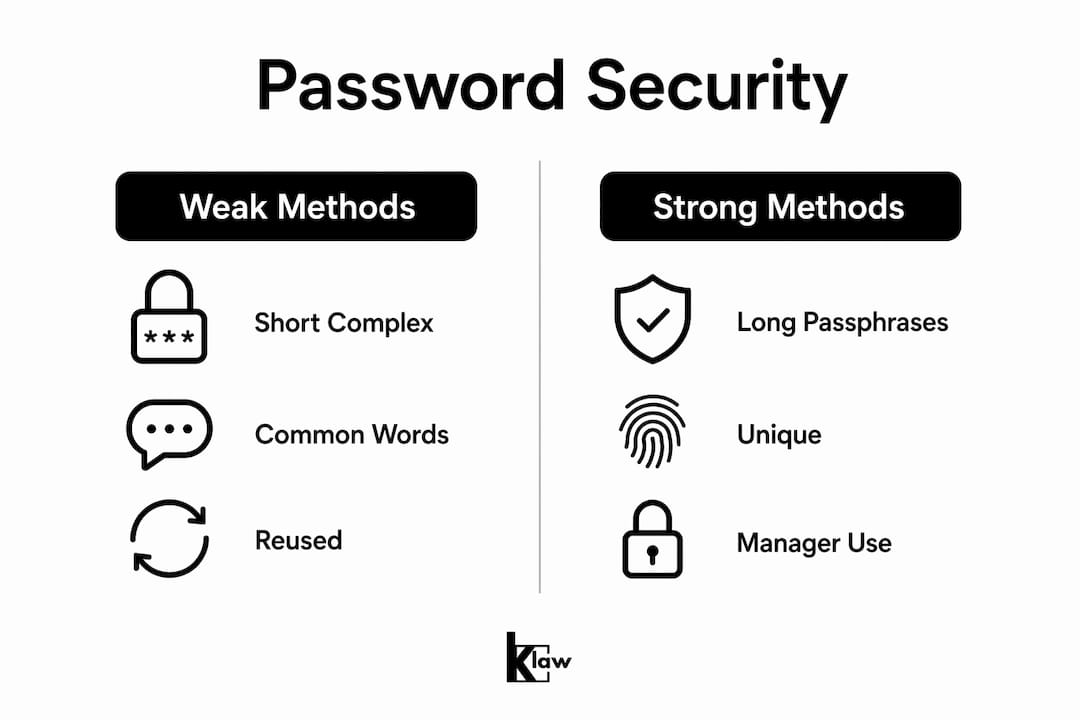
- Prioritize length over complexity. A 16-character passphrase like "correct-horse-battery-staple" is harder to crack than "P@ssw0rd!" by orders of magnitude. Aim for a minimum of 15 characters on every account.
- Never reuse passwords across accounts. Reuse is the primary reason one breach becomes ten. When attackers get one credential set, they run it against hundreds of other sites automatically. This attack method, known as credential stuffing, is responsible for a large share of secondary account takeovers.
- Use a password manager to generate and store credentials. Tools like Bitwarden, 1Password, and Dashlane generate unique passwords at scale that no human could memorize. The NCSC recommends password managers combined with 2SV as the strongest practical security setup when passkeys are unavailable.
- Screen new passwords against breach databases. NIST SP 800-63B requires that new passwords be rejected if they appear in known compromised lists. Password managers like Bitwarden and 1Password do this automatically. You can also check manually using tools like Have I Been Pwned.
- Avoid predictable substitutions. Replacing "a" with "@" or "o" with "0" does not fool modern cracking tools. Attackers build these patterns directly into their dictionaries.
| Approach | Security level | Why it works |
|---|---|---|
| Short complex password (e.g., "P@ss1!") | Low | Cracked in seconds by modern tools despite symbols |
| Long passphrase (16+ characters) | High | Length exponentially increases brute-force time |
| Password manager-generated string | Very high | Truly random, unique per site, no memorization needed |
| Reused password across sites | Very low | One breach exposes all accounts simultaneously |
Pro Tip: Let your password manager autofill credentials rather than typing them. Autofill only works on the legitimate site, which blocks phishing pages from harvesting your input.
What role do two-step verification and passkeys play in post-breach security?
Changing your password is necessary. It is not sufficient. Two-step verification and passkeys are what actually close the gap between a reset and genuine security.
2SV adds a second layer that an attacker cannot bypass with a stolen password alone. Even if your credentials appear in a breach database, 2SV protects the account by requiring a code from your phone, an authenticator app, or a hardware key. Authenticator apps like Google Authenticator, Authy, and Microsoft Authenticator are more secure than SMS codes, which can be intercepted through SIM-swapping attacks.
Passkeys go further. The NCSC's 2026 guidance describes passkeys as the preferred modern authentication method, replacing both passwords and traditional 2SV. A passkey is a cryptographic key pair stored on your device. It binds authentication to the legitimate service, which means phishing pages cannot capture it because there is no shared secret to steal. Google, Apple, Microsoft, and PayPal all support passkeys today.
Here is how to implement both in practice:
- Enable 2SV on Google, Apple ID, Microsoft, and your bank immediately after a breach
- Use an authenticator app over SMS wherever the option exists
- Migrate to passkeys on any platform that supports them, starting with your primary email provider
- Store passkeys in your password manager (Bitwarden and 1Password both support this) for cross-device access
- Keep backup codes in a secure, offline location in case you lose your primary 2SV device
| Method | Phishing resistant | Breach resistant | Widely supported |
|---|---|---|---|
| Password only | No | No | Yes |
| Password + SMS 2SV | Partial | Partial | Yes |
| Password + authenticator app | Partial | Yes | Yes |
| Passkey | Yes | Yes | Growing |
How to systematically reset and secure all your accounts after a breach
A breach rarely affects just one account. Most people have dozens of accounts sharing the same password, which means a single leaked credential can cascade across your entire digital life. A systematic reset workflow prevents that cascade.
-
List every account that shares the breached password. If you use a password manager, it will flag reused credentials automatically. If not, work from memory and focus on financial, email, and social accounts first.
-
Change passwords in priority order. Start with email, then banking and financial services, then social media, then everything else. Email controls resets for all other accounts, so it must be secured before you move down the list.
-
Sign out all active sessions after each password change. Most platforms offer a "sign out everywhere" option in security settings. Use it every time. An attacker with an active session token can stay logged in even after you change your password.
-
Audit account settings for unauthorized changes. Check forwarding rules in email, linked apps in social accounts, and saved payment methods in shopping accounts. Attackers frequently modify these settings to maintain access or harvest data after the initial breach.
-
Use browser and platform tools to identify compromised passwords. Google Password Manager, Safari Passwords, and Firefox Monitor all flag credentials that appear in known breach databases. These tools make the breach alert response faster and more thorough than manual checking.
-
Run a final malware scan after completing all resets. Confirm your device is clean before considering the recovery complete.
Pro Tip: Check your email's forwarding settings immediately after regaining access. Attackers routinely set up silent forwarding rules to receive copies of your messages, including future password reset emails, even after you change your password.
Common mistakes that undermine your post-breach recovery
Most people make at least one of these errors after a breach. Each one can undo hours of careful work.
- Using predictable patterns under pressure. When forced to create a new password quickly, people default to patterns like "Password2026!" or adding a number to their old password. Forced resets without guidance actually increase this risk. Use your password manager to generate the new credential instead.
- Skipping 2SV because it feels inconvenient. The extra 10 seconds per login is the most cost-effective security investment available. Skipping it after a breach is the equivalent of changing your locks but leaving a window open.
- Resetting passwords on an infected device. Repeated prompts asking you to change your password again shortly after a reset are a strong indicator of malware. Malware on your device captures credentials in real time. Treat repeated reset prompts as a red flag, not a glitch.
- Ignoring breach notification services. Services that scan breach databases for your credentials give you advance warning before attackers act. Ignoring these alerts delays your response window.
Checking for breaches after the fact is reactive. The goal is to know before the attacker acts. Set up monitoring now, not after the next incident.
Key takeaways
Resetting passwords alone does not secure a breached account. The combination of a clean device, unique long passwords, active 2SV, and passkey adoption where available is what actually closes the exposure window.
| Point | Details |
|---|---|
| Device check before reset | Scan for malware before changing any password to prevent credential capture. |
| Email account is top priority | Secure your email first because it controls resets for every other account. |
| Length beats complexity | Use 15+ character passphrases or password manager-generated strings over symbol-heavy short passwords. |
| 2SV closes the gap | Two-step verification protects accounts even when the password itself is compromised. |
| Passkeys are the strongest option | Passkeys eliminate phishing risk entirely by cryptographically binding login to the real service. |
Why passwords alone will never be enough again
I have spent years watching people treat a breach like a one-time event. Change the password, move on, done. That mindset is the reason the same accounts get compromised again six months later.
The uncomfortable reality is that passwords are a fundamentally flawed authentication model. They are shared secrets, which means every time you type one, you are trusting that the site, the network, and your device are all clean. That is three separate points of failure on every single login. Passkeys eliminate all three by design, which is why the NCSC's shift toward recommending them as the default is not just a technical update. It is an acknowledgment that the old model is broken.
What I find most interesting about the NIST SP 800-63B updates is the counterintuitive guidance on forced resets. For years, IT departments forced quarterly password changes, and users responded by creating "Summer2025!" followed by "Fall2025!" That predictability made accounts less secure, not more. Stopping forced resets and focusing on breach screening is the right call, but it requires trusting users to respond when an actual compromise occurs.
The practical takeaway is this: build the habit before the breach, not after. A password manager, 2SV on every account, and passkeys where supported take about two hours to set up properly. That two-hour investment protects you from weeks of recovery work. The readers who struggle most after a breach are the ones who treated security as optional until it was not.
— Lucky
Stay ahead of the next breach with Klaw
Changing your passwords after a breach is the floor, not the ceiling. Klaw's Dark Web Alerts monitor your credentials across thousands of breach databases and notify you the moment your email or passwords appear in a new leak, giving you a response window before attackers can act. Pair that with Klaw's Security Training Checklist to build the habits that prevent reactive scrambles in the first place.
Klaw also lets you customize your monitoring through Threat Alert Settings, so you receive targeted notifications based on the specific risks that matter to your accounts. No hidden fees, no subscriptions required to get started. Proactive monitoring is what separates people who catch breaches early from those who find out months later.
FAQ
What should I do first after discovering a password breach?
Secure your email account immediately, since it controls password resets for all other accounts. Then scan your device for malware before changing any other credentials.
How long should a strong password be?
NIST SP 800-63B recommends a minimum of 15 characters, with longer passphrases preferred over short complex strings. Password managers generate and store these automatically.
Does changing my password make my account safe after a breach?
No. Changing your password is necessary but not sufficient. Enabling two-step verification is the most important additional step, as it protects the account even if the new password is later compromised.
What is a passkey and why is it better than a password?
A passkey is a cryptographic key pair stored on your device that authenticates you without a shared secret. The NCSC recommends passkeys as the strongest available login method because they cannot be phished or captured in a breach.
How do I know if my passwords are still compromised after a reset?
Use a breach monitoring service or a password manager with built-in breach alerts to check whether your credentials appear in known leaked databases. Klaw's Dark Web Alerts provide real-time notifications when your email or passwords surface in new breaches.