
TL;DR:
- Breach alerts notify you immediately when personal data appears in a leak, enabling rapid response.
- They are decision-support tools that require prompt action, such as changing passwords and freezing credit, to prevent account takeover and identity theft.
- Continuous monitoring enhances protection, and preparing a response plan in advance maximizes the benefit of these alerts.
Breach alerts are real-time notifications that tell you when your personal information has appeared in a data leak, giving you the window to act before attackers do. The industry term for this practice is data breach monitoring, and services like Have I Been Pwned, Aura, and Klaw have made it accessible to anyone with an email address. Breach notification laws exist to empower defensive steps that reduce harm, not to prevent breaches from happening in the first place. That distinction matters: understanding how breach alerts protect you means understanding that the alert itself is not the protection. Your response to it is.
How breach alerts protect you from account takeover
When your email and password surface in a breach, the clock starts immediately. Automated credential stuffing tools can test stolen login pairs across hundreds of sites within minutes of a breach being published on dark web forums. Alerts prompt immediate password changes for both the breached account and any other account where you reused that password, which is the single fastest way to close the attack window.
The most valuable alerts do more than tell you an account was exposed. They specify what was exposed, such as reused credentials, financial data, or government IDs, so you can prioritize your response. An alert that flags a reused password calls for a different response than one flagging only your name and phone number. Knowing the risk vector lets you act with precision rather than panic.
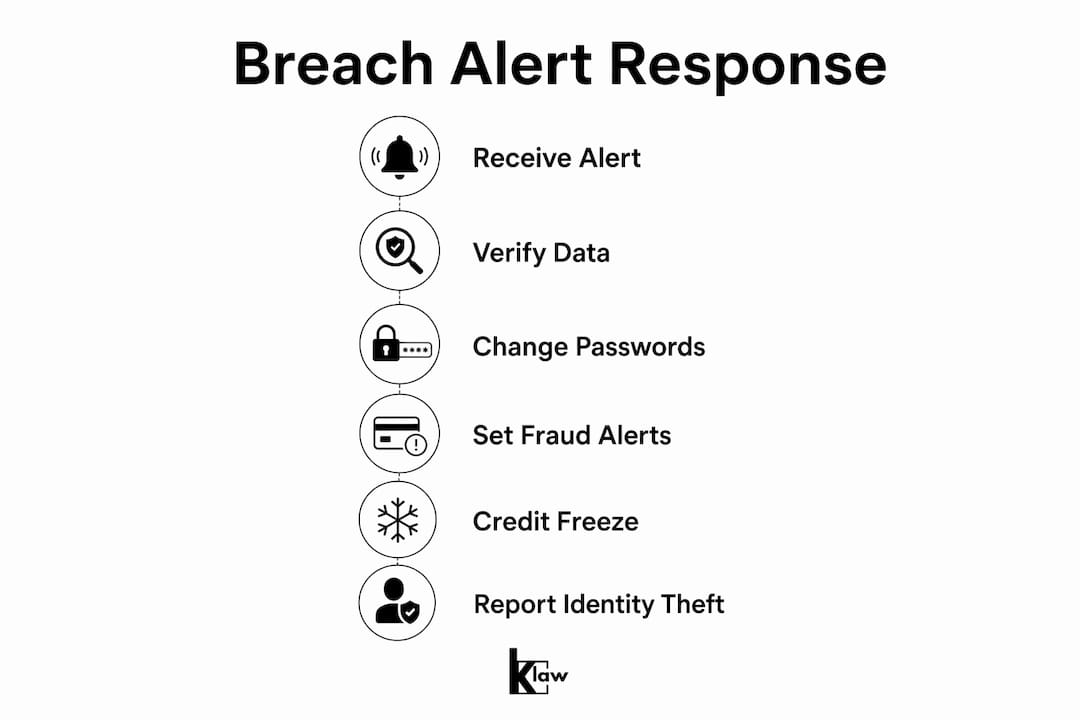
Here is what to do immediately after receiving a credential breach alert:
- Change the breached password first. Log into the affected account and update the password before doing anything else.
- Audit every account sharing that password. Reused passwords are the primary fuel for account takeover attacks.
- Enable multi-factor authentication (MFA). MFA blocks automated login attempts even when attackers have the correct password.
- Check for unauthorized activity. Review recent logins, sent emails, and any account changes made in the past 48 hours.
Pro Tip: Use a password manager like 1Password, Bitwarden, or Dashlane to generate and store unique passwords for every account. When a breach alert arrives, you will know exactly which accounts share that password and can update them in minutes rather than hours.
Learning how to secure accounts after a password leak is a skill worth building before you ever need it. The readers who have a process already in place lose far less than those who figure it out under pressure.
What to do when sensitive personal data is exposed
Not every breach involves just a password. When an alert includes your Social Security number, date of birth, bank account details, or medical records, the threat shifts from account takeover to full identity fraud. These two scenarios require different responses, and most people conflate them.

The two primary tools for protecting your credit after a sensitive data breach are fraud alerts and credit freezes. They are not the same thing, and choosing the wrong one can leave gaps in your protection.
| Feature | Fraud alert | Credit freeze |
|---|---|---|
| What it does | Adds a verification step to new credit applications | Blocks all access to your credit file |
| Who it notifies | One bureau notifies the other two automatically | Must be placed at Equifax, Experian, and TransUnion separately |
| Duration | 1 year (7 years for identity theft victims) | Indefinite until you lift it |
| Cost | Free | Free |
| Best use case | Suspected exposure, moderate risk | Confirmed identity theft or high-risk breach |
Credit freezes restrict access to your credit file entirely, preventing new accounts from being opened in your name, while fraud alerts add an extra verification step that lenders must follow before approving credit. Both are free under federal law. A credit freeze is the stronger protection, but it requires you to temporarily lift it any time you apply for credit yourself.
If your breach alert confirms that identity-relevant data was exposed, filing an FTC Identity Theft Report at IdentityTheft.gov creates a personalized recovery plan with dispute steps, pre-filled letters, and a documented record that carries legal weight with creditors and bureaus. This is the official starting point for any serious identity recovery process.
Pro Tip: Place a credit freeze at all three bureaus within 24 hours of receiving a breach alert that includes your SSN or financial account numbers. You can lift it in minutes online when you need to apply for credit.
Why the timing of breach alerts matters more than most people realize
Speed is the defining variable in breach response. The faster you know, the less damage an attacker can do. The problem is that many organizations delay breach disclosure for legal and investigative reasons, and that gap is getting worse. Troy Hunt notes that slower breach notification practices directly harm consumer protection, because every day of delay is a day attackers operate with your data and you do not.
This is why passive reliance on company notifications is not enough. By the time a company sends a breach notification email, the data may have been circulating on dark web marketplaces for weeks or months. Dark web monitoring scans encrypted networks 24/7 for exposed SSNs, credit cards, and passwords, enabling real-time alerts before cybercriminals have had time to fully exploit the data.
"Continuous monitoring provides early warnings that allow immediate response, which shortens the attacker's advantage window significantly." — DataBreach.io
Continuous email and domain monitoring provides early warnings that allow immediate response, cutting the time attackers have to act on stolen credentials. One-time breach checks, like running your email through a lookup tool once and forgetting about it, offer a snapshot, not a shield. Ongoing monitoring is what converts breach awareness into breach defense.
Understanding data breach disclosure timelines helps you set realistic expectations and explains why third-party monitoring services often alert you faster than the breached company itself does.
How to set up breach alert monitoring for yourself and your family
Setting up effective breach monitoring takes less than 30 minutes and protects you continuously from that point forward. The process involves choosing a service, registering the right data points, and building a response habit.
- Choose a monitoring service. Free options like Have I Been Pwned cover email addresses against known breach databases. Paid services like Klaw, Aura, or Identity Guard add dark web scanning, SSN monitoring, credit alerts, and real-time notifications across a broader data set.
- Register every email address you use. Most people have two to four active email addresses. Each one is a separate exposure point and needs its own monitoring entry.
- Add identity-relevant data where the service supports it. SSN monitoring, phone number tracking, and financial account alerts catch breaches that never involve your email at all.
- Set up family monitoring. Children's Social Security numbers are frequently targeted because they have clean credit histories and breaches often go undetected for years. Add your children's email addresses and, where possible, their SSNs to your monitoring profile.
- Configure alert delivery. Choose push notifications or SMS over email-only alerts. Email inboxes get missed. A phone notification gets seen.
- Build a response checklist. Effective breach alert protection depends on having a documented, prioritized action plan that differentiates what to do within hours versus within 24 to 48 hours after receiving an alert. Write it down before you need it.
- Pair monitoring with complementary habits. Use a password manager, enable MFA on every account that supports it, and run a free credit report check at AnnualCreditReport.com every four months.
The role of breach databases in personal security is to give monitoring services the raw material they need to match your data against known exposures. The more databases a service scans, the earlier and more accurately it can alert you.
Key takeaways
Breach alerts protect you by compressing the time between exposure and response, which is the only variable you can actually control after a breach occurs.
| Point | Details |
|---|---|
| Alerts enable fast response | Receiving a timely notification lets you change passwords and freeze credit before attackers act. |
| Credential alerts need immediate action | Change the breached password and audit all accounts sharing it within the first hour. |
| Credit freezes beat fraud alerts for high-risk breaches | A credit freeze blocks all new credit applications; a fraud alert only adds a verification step. |
| Ongoing monitoring beats one-time checks | Continuous dark web scanning catches exposures weeks before company notifications arrive. |
| Family monitoring closes a major gap | Children's SSNs are high-value targets; add them to your monitoring profile proactively. |
The uncomfortable truth about breach alerts most people ignore
I have spent years watching people treat breach alerts the way they treat smoke detector tests: they acknowledge them, feel briefly unsettled, and then do nothing. The alert fires, they read it, they think "I should do something about that," and they move on. Three months later, a fraudulent credit card account appears in their name.
The alerts are not the problem. The absence of a plan is. Monitoring alerts only work if you act, and acting well requires knowing exactly what you will do before the alert arrives. The people who come out of breaches unscathed are not the ones with the best security software. They are the ones who had a checklist ready and executed it within the first two hours.
There is also a complacency trap that catches experienced users. After receiving a few alerts that turn out to be low-risk, like a forum account breach with no financial data, people start dismissing alerts without reading them carefully. That is exactly when a high-risk alert slips through unaddressed. Every alert deserves a 60-second triage: what was exposed, what accounts are affected, and what is the highest-risk action I need to take today.
Breach alerts are not a security product. They are a decision-support tool. Their value is entirely proportional to the quality of the decision you make after reading them.
— Lucky
Protect yourself with Klaw's real-time breach monitoring
Klaw scans your personal data against over 10,000 breach databases for free, and its dark web alerts notify you the moment your information appears on encrypted networks where stolen data is bought and sold. Unlike services that batch-process alerts weekly, Klaw delivers real-time notifications so you can act within the critical first hours after exposure. You can also customize your threat alert settings to prioritize the data types that matter most to you, whether that is financial accounts, SSNs, or family members' credentials. No hidden fees, no subscription traps. Just the alerts you need, when you need them.
FAQ
What exactly does a breach alert tell you?
A breach alert tells you which of your data points, such as your email, password, SSN, or financial account number, appeared in a specific data leak, and which service or database was the source. The most useful alerts also specify the risk level so you can prioritize your response.
How fast do attackers use stolen credentials after a breach?
Automated credential stuffing tools can test stolen login pairs across hundreds of sites within minutes of a breach being published. This is why acting within the first hour of receiving a breach alert is the most effective window for preventing account takeover.
Is a credit freeze better than a fraud alert?
A credit freeze is stronger protection because it blocks all access to your credit file, preventing new accounts from being opened entirely. A fraud alert only requires lenders to take extra verification steps, which is useful but does not fully block fraudulent credit applications.
Can I monitor my whole family's data, not just my own?
Yes. Services like Klaw allow you to add multiple email addresses and identity data points, including those of children and other family members. Children's SSNs are particularly high-value targets because their clean credit histories often go unmonitored for years.
Do breach alerts prevent breaches from happening?
Breach alerts do not prevent breaches. They notify you after your data has already been exposed so you can take protective action. The protection comes from your response, not from the alert itself.